FREE Downloads

<1 min read

Okay, so what's the deal with Free downloads? When was the last time you paid to download anything? Does it mean it's free to download but you'll have to pay later? Duh… You got me fooled. There's no such thing as a free lunch. Does putting the free in there make it more appealing? I guess it sounds better than trial or crippled. I don't know. Maybe I got too much free time on my hands or maybe I should just start a free meme.

Compiling Python Bindings for Subversion 1.3.0

<1 min read

I was trying to setup ViewVC to display both my public cvs and subversion repositories. It meant I had compile the swig-py bindings. Subversion 1.3.0 requires SWIG 1.3.24 or later. Or so they say…

I'm using 1.3.27, yet ./configure kept on barfing. Apparently the script does some voodoo magic to parse the current version number. It's failing miserably.

Here is what I did to get it to compile:

cp -p configure configure.orig
sed -e 's/"103025"/"103027"/g' configure.orig > configure
which basically makes a backup copy of the configure script, then replaces the hard-coded version number.

From then on, the regular compilations steps worked:

./configure --with-apr=/usr/local/apache --with-apr-util=/usr/local/apache
make
make install
make swig-py
make install-swig-py
echo /usr/local/lib/svn-python > /usr/lib/python2.2/site-packages/subversion.pth
Looks simple, but it took a while to figure it all out.

SVN with SmartSVN, IDEA and Eclipse

2 min read

In the last few days, I've been slowly converting from CVS to SVN as my primary repository.

Creating the repository was easy. Importing my existing projects, no so much. As far as I can tell there is no way to import projects using IntelliJ IDEA.

I've been using SmartCVS for years, so I figured it'd give SmartSVN a try. Importing existing projects was a breeze.

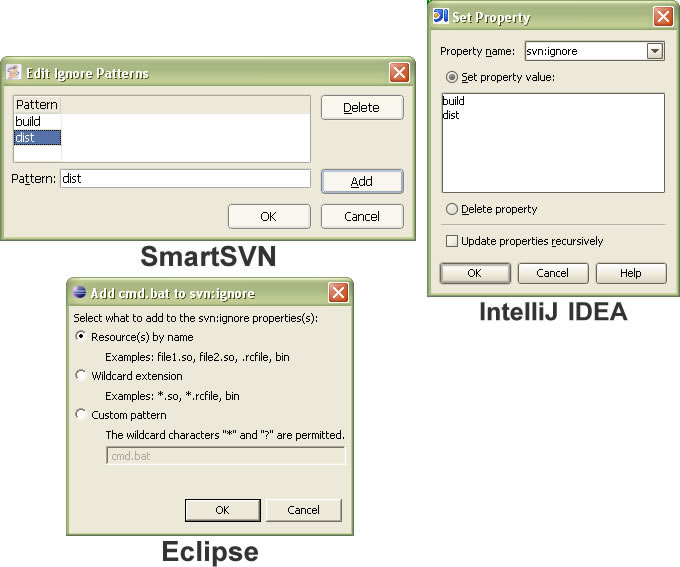
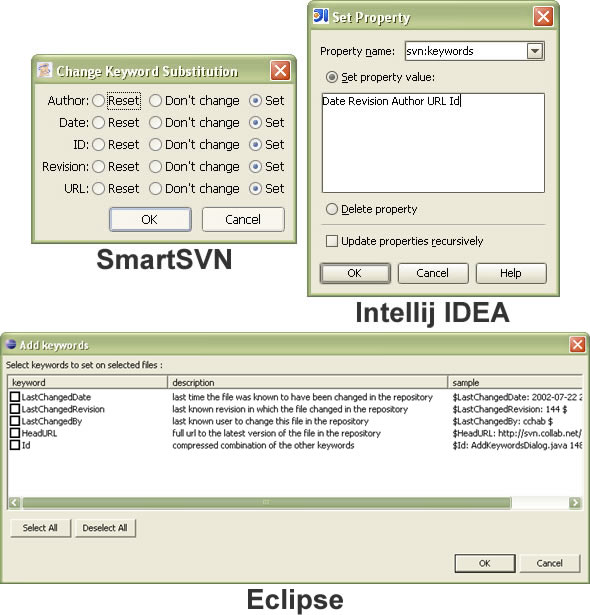
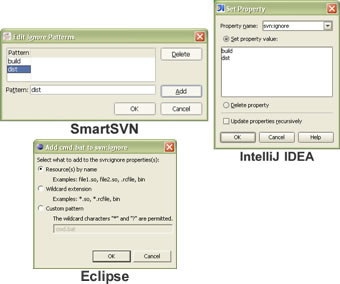
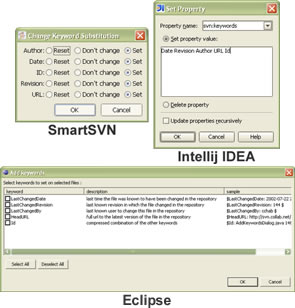
Next, I needed to figure out how to ignore certain directories (build, dist, etc.) in some of my projects. I also needed a way to do keyword substitutions, like CVS does.

I found a great resource here. I should have looked in SmartSVN for those options, they were pretty obvious. Unfortunately by then I was already back to using IDEA.

Once I understood what needed to be done, it was pretty straight forward.

Ignored Patterns

To define ignored patterns:
Keywords Substitution

To setup keywords substitution:
Smooth sailing from then on. I did find and reported a a problem with IDEA and private SSH keys. No answers yet.

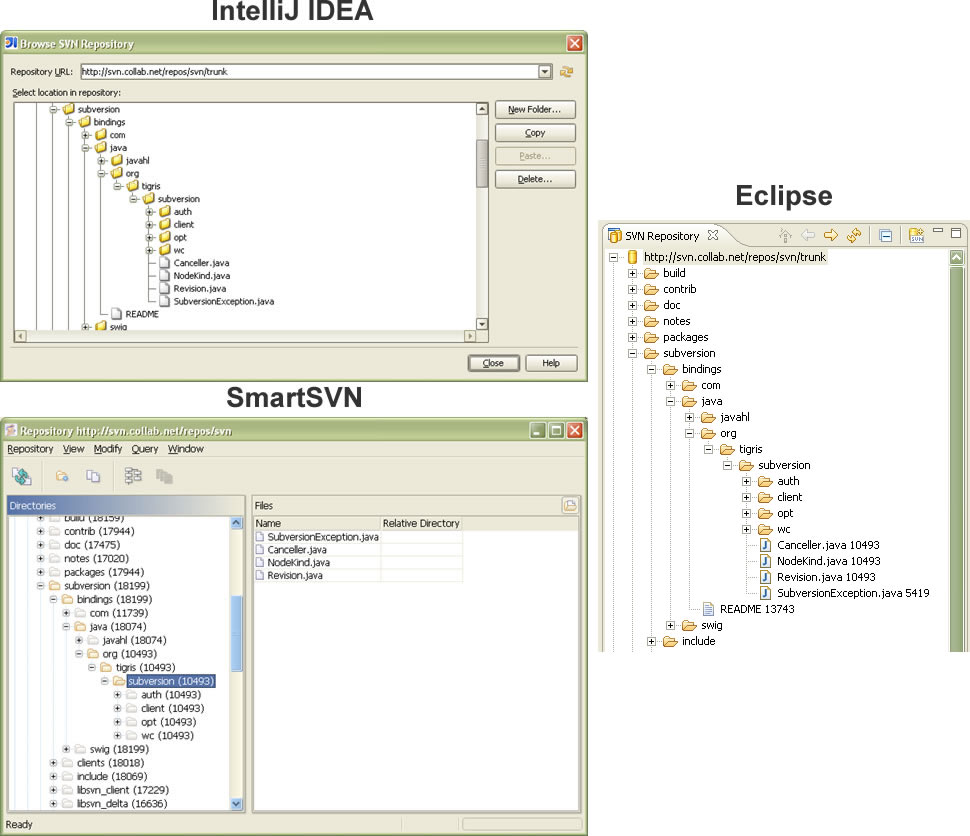
Browsing

Both SmartSVN and IDEA support repository browsing:
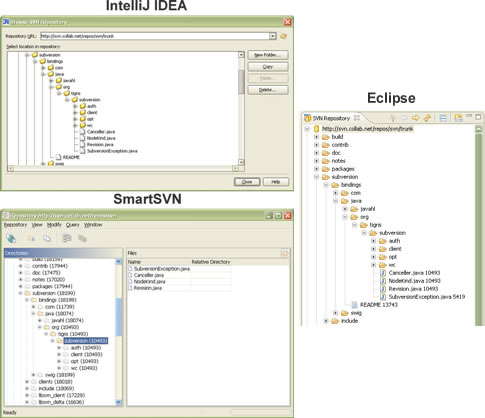
I have to admit that IDEA's approach is nicer, somewhat similar to Eclipse.

Eclipse

So what about Eclipse? Well, as far as I can tell there is no way to set the properties. But that's the least of my problems. Using Subclipse with SSH is nightmarish.

Unless you are willing to setup a SSH private key with no passphrase, you'll have to deal with re-entering your passphrase every 3 seconds or so.

I use SecureCRT for my SSH needs. The latest version (5.1) includes an activator SSH agent to save passphrases between sessions. Now I just have to deal with new cmd windows popping up 2 or 3 times per command. Apparently the Subclipse folks haven't figure out how to access the SVN server in a single session.

There's gotta be a better way.

[@688]
And there is. As Jeff mentioned setting Subsclipe to use JavaSVN (under Windows->Preferences->Team->SVN) does the trick.
[@755]
As Mark pointed out there are ways to do most everything with Eclipse. I've updated the screenshots.

JavaSVN

The interesting part of all of this, is that SmartSVN, IDEA and Subclipse are all using JavaSVN underneath.

So far, apart from SmartSVN, they all have what I'd consider to be major startup issues.

SLVR L7 PR Reviews

<1 min read

I'm so tired of reading PR Reviews. Enough already.

Take this First Look: Motorola SLVR iTunes Phone review for example.

This guy is just rehashing the official press release. He's never actually seen the phone. What are we? Stupid?

Well, maybe…

Quick HTTP POST request

<1 min read

Have you ever wanted to quickly send a POST request to a HTTP server? It's pretty easy to do using curl.

For example to send XML via a POST request, you could use the following:

curl --header "Content-Type: text/xml" --data "…." http://www.foo.com/

I use this method for testing almost every day. Saves a lot time.

There's a tip entry in the wiki too.

[@693]

Another curl command I use often is:

curl -I http://www.example.com/

to get a HEAD request.

[@699]

And:

curl --header "Accept-Encoding: gzip" http://www.foo.com/ | gunzip

to get the compressed request.

IE7, the feed master.

<1 min read

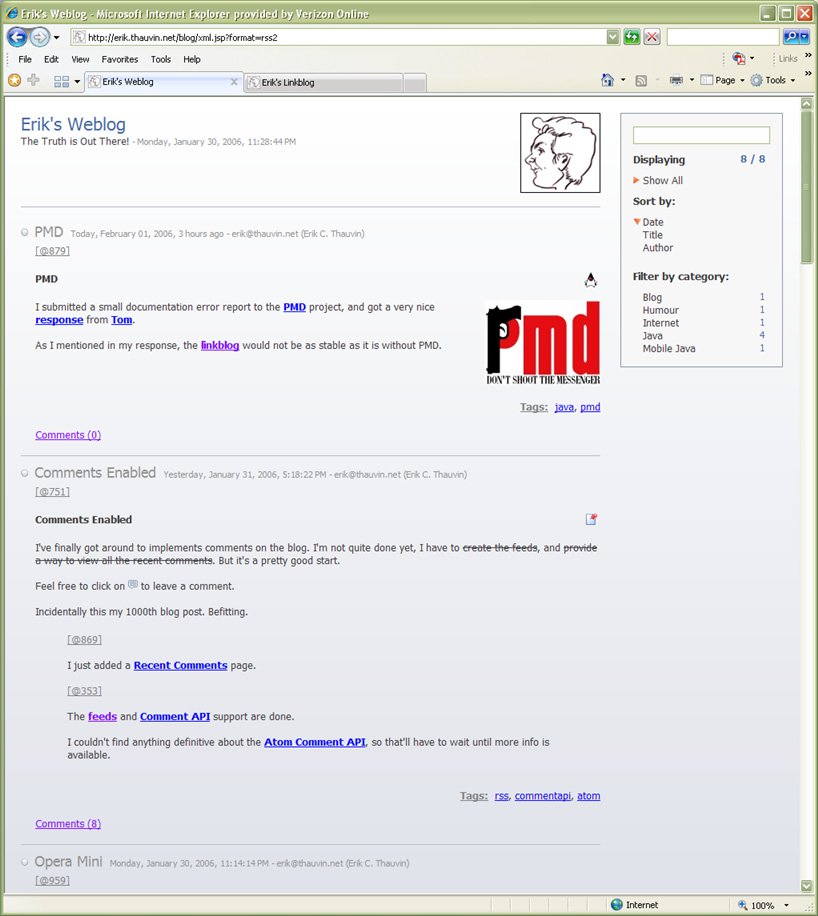
I've been playing with IE 7 Beta 2 preview for a few minutes. I does a terrific job with feeds. Wow!

Regardless of how good it really is, I suspect people are going to flock back to IE in mass. Firefox days in the limelight are up.

[@635]
Ed jolted down his first impressions. Including some visual problems with Eclipse.

Joey is complaining that IE7 beta still can't handle port numbers, which bugs me too.