
Comments Enabled
I've finally got around to implements comments on the blog. I'm not quite done yet, I have to create the feeds, and provide a way to view all the recent comments. But it's a pretty good start.
Feel free to click on  to leave a comment.
Incidentally this my 1000th blog post. Befitting.
[@869]
I just added a Recent Comments page.[@353]
The feeds and Comment API support are done.I couldn't find anything definitive about the Atom Comment API, so that'll have to wait until more info is available.
Java2Html and IntelliJ IDEA
IDEA can export Java source code to HTML, which I find quite useless. I really like the way Java2Html works but there is no integration with IDEA.
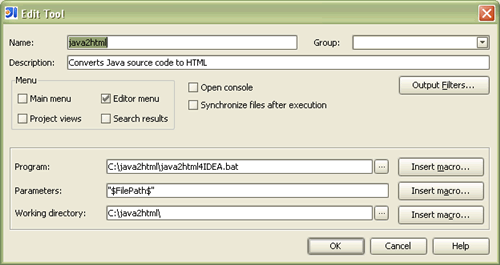
You can easily setup an External Tool in IDEA using the Java2Html command line options.
The problem is that I also wanted to:
- View the generated HTML code right away.
- Discard the resulting HTML file when done. I usually only need to copy/paste elsewhere.
I created a simple batch file to help me accomplish my goal…
java2html4IDEA.bat @echo off
setlocal
set TMPFILE="%WINDIR%\temp\%~n1%~x1.html"
java -jar java2html.jar -srcfile %1 -targetfile %TMPFILE%
notepad %TMPFILE%
endlocal
@echo on
What does it do?
- Passes the first argument (the path to the Java source file) to Java2Html.
- Instructs Java2Html to save the resulting HTML file directly to the Windows temporary files directory.
- Automatically opens the HTML file with Notepad.
To use it, simply place it in the same directory as the Java2Html jar, in my case C:\java2html.
The only thing left to do was to create the External Tool entry in IDEA, as follows:
Testing Private Methods
I've been playing with TestNG for a few days now. I really like it. It makes me want to write more tests.
I was wondering if there was a way to create a test for a private method, so I went to the source. I asked Cédric about it. He mentioned that I should use the Reflection API.
The goal was to write a test for the validate method in the following class:
package net.thauvin.erik;


public class Example {

  // …


  private static int validate(String username, String password, int days) {

    // …


    return days;

  }

}
In order to invoke the validate method in my test, I simply needed to:
- Retrieve the method using
Class.getDeclaredMethod() - Make it accessible using
Method.setAccessible()
as follows:
package net.thauvin.erik;


import org.testng.annotations.*;


import java.lang.reflect.InvocationTargetException;

import java.lang.reflect.Method;


public class ExampleTest {

  // …


  @Test

  public void validateTest() throws NoSuchMethodException,

      IllegalAccessException, InvocationTargetException {

    final Method validate = Example.class.getDeclaredMethod("validate",

        String.class, String.class, int.class);

    validate.setAccessible(true);


    assert (new Integer(10).equals(validate.invoke(validate, "test",

        "passw0rd", new Integer(10))));

  }

}
Pretty nifty trick.
[@514]Bob emailed me the following:
I would just make the method package-private (default access) and put the test in the same package.Bob
As I told him, friendly access doesn't always work for me because of the way I obfuscate private methods. I could make exceptions in my obfuscator settings, but that's a lot more work.
You might want to read Bob's post on Package Scoping and Unit Testing.
[@395]
Eugene rightfully pointed out that Commons Lang provides helpers to reflectively invoke methods.