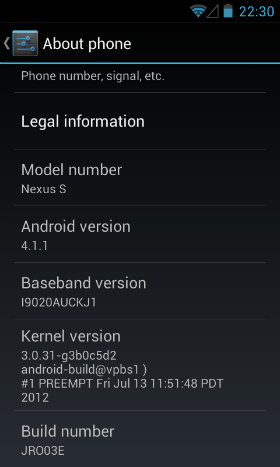
How I upgraded my AT&T Nexus S (I9020A) to Jelly Bean (Android 4.1.1)
I just upgraded my Nexus S to Jelly Bean over-the-air (OTA). It only took about 4 hours to figure it all out.
I had already upgraded to ICS 4.0.4 the manual way (since OTA never came for me), but that simply did not work with Jelly Bean. I found this XDA thread which led me to try to get the update OTA. A few tweaks later I was able to successfully download the package, unfortunately it never let me install it. So close, yet so far...
A few more unsuccessful tweaks, and then it hit me...
Here is how I did, step-by-step.
- Power off.
- Remove the SIM.
- Power on.
- Turn on Wi-Fi and connect to your network (if not connected already).
- Go to the System settings.
- In Language & input change the language to English (United Kingdom).
- In Apps select the ALL tab.
- Find and open the Google Services Framework.
- Tap on the Clear data button and confirm.
- Reboot.
- Go to the System settings.
- Select About phone.
- Select Software update.
- The package should be downloading, wait...
- Once the package is verified, you'll be offered an option to restart and install. Don't!
- Turn Airplane mode on by pressing and holding the Power button.
- Now, select the Restart & Install button.
That's all folks!
Comments
Followed steps with no results. When clicking chech now no updates were found. On Nexus S I9020A (AT&T model)
It worked for me!!!!!!!, just try to make the step 9,10,11,12,13 as fast as possible, specially 9 and 10
Thanks so much!!! This worked on my I9020A (US AT&T), too!
The first time, it grabbed IMM76M, then repeating steps 7 - 17 got me the JRO03E update!!!
Got IMM76M on the first try. Then repeated two more times, but didn't get JRO03E update. Will try again later. Thanks much! (i9020A, US AT&T)
Worked perfect on( AT&T US). No problems on first try. This is the best method without unlocking the boot loader.
Nice works, thanks for the post.
Thanks for this, I tried manually flashing IMM76M all morning and got nowhere, even factory reset didn't help. But this update got that for me. Have tried the manual update to 4.1.1 found on android central and xda but that's still erroring, I am going to repeat these steps a couple more times.
Thanks a lot dude.. It worked... omn my Nexus S I9020A unlocked model.
Got it on the third try. I did reinstall the SIM and set back to US English. Then started over from the top. Great work!
ok i did all the steps and something odd happened for me instead of getting a update for Jelly bean i got one for Ice cream sandwich...can someone tell me what just happened Email at [email protected] thx
Awesome, totally worked fOR US AT&T, first updated to ice cream then to jelly bean...AMAZING!!
SUCCESS!!!!...this is awesome thank you
Worked like a charm for I9023 in Cosmote Greece
Success! Worked for US at&t on IMM76D, updated straight to JRO03E. The Language & Input change wasn't necessary for me to get the update.
Step 14 taking forever, anyone else have similar issue?
WORKED LIKE A CHARM!!!! Thanx A Lot!!!!
Would this also work for a IMM76M ????
Worked perfectly for me (U.S. at&t). Did not touch language settings. Took less than an hour to go from 2.3.4 to 4.0.4 (IMM76M) and then to 4.1.1 (JRO03E)including allowing the Google apps to update from the Play Store while on Ice Cream Sandwich. Thanks a million. Waiting on at&t OTA's is like watching cars rust.
I am stuck on step 14 ......
You are the friiickennnn mannnn!!!! Followed every step and worked like a charm. Im on Tmo.
Holy crap this worked! AT&T in the US, thank you! its important to do 9 and 10 fast it wasnt working for me at first til I did that
Didn't work all the way for me. On the first try it got me to IMM76M, but I can't seem to get past that. Anyone else know a fix for this. I keep repeating the method above and still no JRO03E. (at&t)
Works on a danish Nexus S with TDC. Thansk
Worked for me! i9020T, USA T-Mobile
Thanks!
Stuck on ice cream sandwich. Tried again and again to get jelly bean, but no success. Guess I have to try some more!
This worked great on my att i9020a today. USA AT&T. Followed directions exactly including language change.
Do you have to be running ICS or can you do this on gingerbread?
I didn't include changing the language, but it's pulling down right now on my AT&T version. Thanks for the help! I've been wearing out the "check now" button all weekend!
This worked great, thanks so much! AT&T never pushed ICS, but this process got both in sequence. Only wish I knew about this six months ago!
hi mahesh are you srilankan...will jellybean work on mobitel network
Fucking Erik man...!! YOU'RE A FUCKING GENIUS!!! ;D
Thx! Good for me in Slovenia
is this stock android or a custom rom
In my case, I had already installed ICS manually. I followed the steps and It downloaded and re installed ICS. Immediately I tried to get JB but it wasn't downloading. I used the phone for a couple of hours and tried again, same steps. It downloaded and install JB. Thanx
Works as advertised: i9020a, AT&T.
so it let me download the update but i keep getting the yield sign when i press "reboot and install" :( has this happened to anyone?!?!?!? :'(
after two frustrating days, it hit tonight. Thanks,Erik.
Thanks a bunch bud .. worked like a charm
After 4 days of wait.. Finally I got the update.. didn't have to change the language..
Thanks a ton, Erik!
I did all the steps twice and still no results
Will this update delete my data in the internal memory card?, including photos, videos, music, apps, etc..., can you please help by answering this question?
After I clear data and confirm and reboot, when i go to system updates it still says system is up to date
Stock non-rooted Nexus S 1090T: Okay, I tried the suggested approach to no avail. Then I re-inserted the SIM card and re-booted. I noticed that my wireless icon was downloading beau-coup data, so I waited until it stopped, went into Settings > About Phone, and it displayed the message that it was about to install Jelly Bean 4.1.1. It uncompressed the 114MB file, and then came up with the prompt "Restart and Install". AT THAT POINT, I TURNED ON "AIRPORT MODE", and rather than simply exiting and doing nothing as it has always done in the past, it actually rebooted and began the Jelly Bean installation! Once completed, I turned Airport Mode off and switched my language back to English (US).
I am not sure why the presence of (AT&T) cellular activity would make a difference, but removing it sure helped!
I did get the update to download and verify with these instructions, but I got stopped with the yield sign/exclamation mark every time during the install. As has been mentioned elsewhere, this is most likely due to an unlocked/rooted phone. To get 4.1.1, I flashed it onto my I9020A using the following: http://forum.xda-developers.com/showthread.php?t=1572307
Worked like a charm, and no phone trickery involved.
Same situation as Mike posted on July 29th 2012. It worked after following the posted steps and then reinserting the sim card and re-checking. The 114 mb kernel was downloaded OTA and when it was ready for install I switch into aeroplane mode. After all was installed and rebooted I switched back to English US
I tried all of the steps as well with an AT&T Nexus S, it said software up to date every time.
Try the link I posted yesterday, mstenberg. I've already done three phones that way and you don't have to fool the phone into starting the download. Plus, once you set things up via those instructions, you can flash any of the releases...
Worked for my AT&T Nexus S I9020XXKI1
Just couldn't wait for OTA... Thanks a bunch!
I have tried a few times but still no luck :(
I also have an unlocked I9020A and it does not work for me. I tried powering down (Power Button -> Power off) and a battery pull immediately after clearing the data in step 9. Any ideas?
There must be something missing in all of this. I have tried these steps over many days, and from different locations, but the update never occurs. It always says it is up to date. Could something I have installed on the phone be causing it to hold onto data that won't let it update?
Thanks. Can anyone rate the performance of JB on Nexus S?
Battery life, navigation, anything else?
How would it work with AT&T model on GB 2.3.6? There is no way to check for software update in About Phone menu! Should we upgrade to 4.0.4 first?
Worked on first try! Thanks!
My AT&T I9020A does not have a removable SIM card. The 16GB storage is built-in. How do I handle instruction #2 "Remove the SIM"?
This worked for me. Thank you so much. :)
@Stan You do have a removable SIM card. What you are thinking isn't the SIM, but a micro sdhc card. Two different things. Pop open the back and you'll see that it's there. If you don't know what a SIM card looks like read the manual that came with the phone or google it.
I have been trying this on my nexus s i9020a with gingerbread 2.3.4 with no luck at all. Am I missing something or do I need to download something first?? Are my apps/widgets on boot getting in the way? Id love to have JB so any help would be most appreciated and thanks for the info in the first place.
This method does not work anymore. I keep getting "Your system is currently up to date". I'm running 4.0.4 IMM76D on my AT&t Nexus S, trying to get JB. I followed all the steps exactly as mentioned above. Any help is appreciated ?
Does "reboot" in step 10 means powering off and on again?
Can not get this to work at all.
This appears to no longer work. I'm running 4.0.4 IMM76D on AT&T Nexus S (Same as Nihar, above) and have done all the steps as mentioned. This phone has never had an OTA, I started with the original Gingerbread and flashed 2 updates to get it to ICS earlier today, but can't get JB OTA to work (and can't flash the JB zip manually because the ICS recovery is known to be bugged).
No luck on my i9020a running IMM76D either. Anyone know the best alternative?
Having same issues, tried all the steps multiple times and still was unable to get it to update. After i rebooted from clearing data from Google Service Framework and went into about phone / system updates is said up to date ( last check 06/12/1969 ) for a couple seconds than said last check was current time. Am i doing something wrong??
Tried exactly as stipulated this evening and no dice for me either. I tried a second time and force-closed Google Framework Services before clearing data (as mentioned in other posts) but still no joy. Would turning off Location Services make a difference?.... I think if this did work at one time, that window is now closed... Guess I'm rooting this bad-boy...
Same deal as the rest, i9020A AT&T IMM76M (sim in or out, doesn't matter) can clear the Google Services Framework and reboot the phone and whatever else until I die of starvation and nothing changes. Always 'up to date'!
And today's news about the dialer exploit (the Nexus S will auto dial/execute to display the IMEI instead of making you have to push call, so it is hypothetically vulnerable to the wipe issue) that is fixed in Jelly Bean is like a slap in the face.
This doesn't seem to work anymore. Looks like Google fixed it.
Tried it again and still no success. I would not be surprised if ATT never intended to offer the OTA upgrade and shut down the access point once discovered. Someone at ATT wanted to help the customers get updated. They are probably looking for a new job knowing how ATT operates. Google definitely needs to step in and own the upgrade process post JB.
Add me to the list of people with an i9020A phone stuck on ICS. It's frustrating knowing there's an update out there if someone would just go to the effort of flicking the switch. I'd prefer not to jailbreak but I don't see much option.
PERFECT - the only process that worked - I tried a lot of variations on clearing/stopping Google Services before this one worked - Genius! AT&T Nexus S I9020XXKI1 - now just waiting for 4.2!
After manually flashing (not rooted) 2.3.6 and 4.0.4, things work fine. But when I try flashing P2lZDQWb.zip for 4.1.1 from Fastboot > Recovery, I get an error after verifying package. assert failed apply_patch_space (16570800). Did anyone encounter this and resolve? please assist. Thanks.
AT&T Nexus S - I9020AUCKJ1, Build IMM76D
I was able fix this after numerous reading and tries. Had to > fastboot oem unlock > flash stock 4.0.4 again, then flash 4.1.2. I used the images from developers.google.com/android/nexus/images
Hope this helps for those stuck with the assert failed issue.
AT&T Nexus S now on 4.1.2 (JZO54K)
I've taken this phone home to India after buying it in the US and am using it with an Indian SIM. I cannot seem to get the phone updated any more? Any particular reason why? I tried the above method, wouldn't work. is there a detailed website that shows how to update 2.3.4 to 4.1.2? Do we need to update to all intermediary OS's before getting to the latest version?
E-mail me at [email protected]